
AWS IAM role setup
Exactly what access Faultline needs to your AWS account, and nothing more. Start read-only; add remediation when you trust it.
By Chris Collareta · Published · Updated
What does Faultline do in my AWS account?
Faultline monitors ECS services by comparing running tasks to the desired count, and (only if you allow it) restarts or scales a service from a runbook. It never reads your logs, secrets, task definitions, or anything outside ECS.
| Capability | IAM action | Needed for |
|---|---|---|
| Monitoring | ecs:DescribeServices | ECS health checks, and polling a restart until its rollout settles |
| Remediation (optional) | ecs:UpdateService | The Restart ECS Service (force new deployment) and Scale ECS Service (desired count) runbook steps |
That is the complete list. Faultline does not need iam:PassRole because it never registers task definitions or changes the roles your tasks run as.
How does Faultline get access?
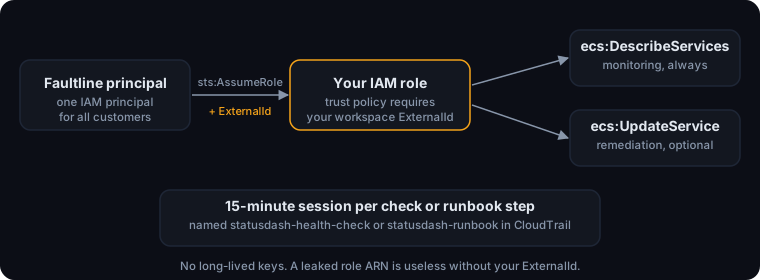
By assuming an IAM role you create, for 15 minutes at a time. AWS documents this pattern for giving a third party access to your account.
- You create an IAM role in your account. Its trust policy lets one Faultline IAM principal call
sts:AssumeRoleon it. - Faultline assumes the role for each check or runbook step, with 15-minute sessions (the shortest AssumeRole allows). No long-lived keys for your account are ever created or stored.
- Sessions are named
statusdash-health-check(monitoring) andstatusdash-runbook(remediation), so every call Faultline makes is attributable in CloudTrail.
Why does the trust policy need an ExternalId?
So that no other Faultline customer can use your role. Every customer's role trusts the same Faultline principal. Without something extra, anyone using Faultline who learned your role ARN could point a monitor at it. The sts:ExternalId condition closes that gap (AWS calls it the confused deputy problem):
- Faultline generates one ExternalId per workspace. You cannot choose it, and no other workspace can use it.
- Faultline sends it on every
AssumeRolecall for your workspace, and ignores any other value. - Your trust policy requires it. A leaked role ARN on its own is useless.
Find it in the dashboard: Services, Add Service, ECS. The External ID field is read-only, and the Download trust policy button produces a policy with both the Faultline principal and your ExternalId already filled in.
Trust policy
Use the dashboard download. For reference, it has this shape (the two placeholders are filled in for you):
{
  "Version": "2012-10-17",
  "Statement": [
    {
      "Effect": "Allow",
      "Principal": { "AWS": "<FAULTLINE_PRINCIPAL_ARN>" },
      "Action": "sts:AssumeRole",
      "Condition": {
        "StringEquals": { "sts:ExternalId": "<YOUR_WORKSPACE_EXTERNAL_ID>" }
      }
    }
  ]
}
Read-only monitoring policy
Start here. With only this policy, Faultline can watch your services and page you, but cannot change anything.
{
  "Version": "2012-10-17",
  "Statement": [
    {
      "Sid": "FaultlineEcsMonitoring",
      "Effect": "Allow",
      "Action": ["ecs:DescribeServices"],
      "Resource": "*"
    }
  ]
}
Remediation policy (optional)
Attach this as a second, separate policy when you want runbooks to restart or scale services. Removing it later turns Faultline back into a read-only monitor without touching anything else.
{
  "Version": "2012-10-17",
  "Statement": [
    {
      "Sid": "FaultlineEcsRemediation",
      "Effect": "Allow",
      "Action": ["ecs:UpdateService"],
      "Resource": "*"
    }
  ]
}
Be aware that IAM cannot limit ecs:UpdateService to specific parameters. Faultline only ever sends forceNewDeployment (restart) or desiredCount (scale), but the permission itself would allow other service updates. Scope it to specific services (below) if that matters to you. Runbooks also require approval by default; see Runbooks and approvals.
Can I limit Faultline to specific clusters or services?
Yes. Both actions accept ECS service ARNs as resources, so you can limit Faultline to one cluster for monitoring and a named list of services for remediation:
{
  "Version": "2012-10-17",
  "Statement": [
    {
      "Sid": "FaultlineEcsMonitoring",
      "Effect": "Allow",
      "Action": ["ecs:DescribeServices"],
      "Resource": "arn:aws:ecs:us-east-1:123456789012:service/prod/*"
    },
    {
      "Sid": "FaultlineEcsRemediation",
      "Effect": "Allow",
      "Action": ["ecs:UpdateService"],
      "Resource": [
        "arn:aws:ecs:us-east-1:123456789012:service/prod/checkout-api",
        "arn:aws:ecs:us-east-1:123456789012:service/prod/orders-worker"
      ]
    }
  ]
}- Use one role per AWS account. One role can cover every cluster and region in it.
- A monitor or runbook step pointed at a service outside the resource list fails with an AccessDenied error, which shows up on the check or the incident timeline.
Setting it up with the AWS CLI
Download the trust policy and role policy from the ECS monitor form, save the remediation policy above as faultline-remediation-policy.json if you want it, then:
1. Create the role with the trust policy from the dashboard download.
aws iam create-role \
  --role-name faultline-monitor \
--assume-role-policy-document file://faultline-trust-policy.json2. Attach read-only monitoring.
aws iam put-role-policy \
  --role-name faultline-monitor \
  --policy-name faultline-ecs-monitoring \
--policy-document file://faultline-role-policy.json3. Optional, later: attach remediation.
aws iam put-role-policy \
  --role-name faultline-monitor \
  --policy-name faultline-ecs-remediation \
--policy-document file://faultline-remediation-policy.json4. Copy the role ARN into the Faultline ECS monitor form.
aws iam get-role --role-name faultline-monitor --query Role.Arn --output textThen, in the dashboard:
- In Faultline, open Services, Add Service, ECS.
- Enter the region, cluster, and service name.
- Paste the role ARN into Cross-Account Role ARN.
- Save. The first check runs within one interval; an AccessDenied error at this point almost always means the trust policy's ExternalId or principal does not match the download.
How do I revoke Faultline's access?
Detach the remediation policy to drop back to read-only; IAM evaluates permissions on every call, so this applies to Faultline's next request. Deleting the role stops Faultline from starting new sessions, and any session already open expires within 15 minutes.
More docs
- Quickstart: first monitor in 5 minutesAdd an HTTP monitor, route alerts, and trigger a real test incident.
- Runbooks and approvalsApproval by default, per-runbook auto-run, verification, and the audit trail.
- Connect Claude (MCP)API key, Claude Code and Claude Desktop config, tools, and a sample session.
- CLI and heartbeatsMonitor cron jobs, queue workers, and Docker containers.
- Security and data handlingTenant isolation, sign-in, AI data flow, token caps, and retention.