
CLI and heartbeats
Some failures are invisible from outside: a cron job that stopped running, a worker stuck on an empty queue. Heartbeats catch them by expecting a ping and alerting when it stops.
By Chris Collareta · Published · Updated
How do heartbeats work?
- You create a heartbeat check with an interval (how often the job should ping) and a grace period (extra slack for slow runs).
- Your job pings a unique URL each time it succeeds.
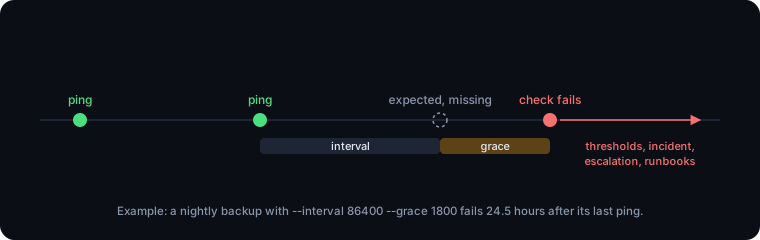
- If no ping arrives within interval plus grace, the check fails and goes through the same thresholds, incidents, escalation, and runbooks as any other monitor. The next ping recovers it.
- The token in the URL is the only credential, so the job itself needs no API key. Treat the URL as a secret.
How do I install the CLI?
With npm, on Node.js 18 or later. Then save an API key once, or set it as an environment variable.
npm install -g faultline-cli     # Node.js 18 or later

# One-time setup: saves your API key to ~/.faultline/config.json
faultline configure

# Or, on servers and in CI, use environment variables instead
export FAULTLINE_API_KEY=flt_your_key_here
export FAULTLINE_API_URL=https://api.fltln.io
Creating checks needs an API key (Settings, API Keys, on Pro and above). Pinging does not.
How do I create a heartbeat check?
Run faultline check create with an interval and a grace period, in seconds. It prints the ping URL.
faultline check create nightly-backup --type heartbeat \
  --interval 86400 --grace 1800

# Created heartbeat check "nightly-backup" (service clx8m2k3p0000abc123def456).
#
# Ping URL, call this at the end of your cron or worker run:
# curl -fsS https://api.fltln.io/hb/hb_AbC123...| Flag | Default | Meaning |
|---|---|---|
-t, --type | heartbeat | heartbeat, or http to create a URL monitor (with --url) |
-i, --interval | 60 | Seconds between expected pings |
-g, --grace | 60 | Extra seconds before a missed ping counts as a failure |
-d, --description | none | Optional description |
Push syntax
faultline push hb_AbC123...                          # bare token
faultline push https://api.fltln.io/hb/hb_AbC123... # or the full ping URL- No API key needed. For a bare token it uses
FAULTLINE_API_URL, orhttps://api.fltln.ioif unset. - Gives up after 10 seconds, so a network problem never hangs your job.
- Exits
1on an unknown token, any HTTP error, or a network failure, so&&chains and healthchecks see it. The token is masked in output. - The ping URL also accepts a plain GET or POST from curl, wget, or any HTTP client.
How do I monitor a cron job?
Chain the ping after the job with &&, so it fires only when the job succeeds. The schedule syntax is standard crontab(5).
# crontab -e
# Ping only if the backup succeeded. Cron has a minimal PATH, so use the
# full path to the CLI (find it with: command -v faultline).
0 3 * * * /usr/local/bin/backup.sh && /usr/local/bin/faultline push hb_AbC123...

# No Node.js on the box? curl does the same job:
0 3 * * * /usr/local/bin/backup.sh && curl -fsS -m 10 -X POST https://api.fltln.io/hb/hb_AbC123...
For a daily job, set --interval 86400 and a grace that covers your longest normal run, for example --grace 1800.
How do I monitor a queue worker?
A long-running worker never exits, so ping from inside the loop on a timer. This catches a crashed process and also a loop that is stuck, which a process monitor would miss.
# Python queue worker: prove the consume loop is alive, even when the queue
# is empty. Create the check with --interval 60 --grace 60.
import os, time, urllib.request

PING_URL = os.environ["FAULTLINE_HEARTBEAT_URL"]
PING_EVERY = 60
last_ping = 0.0

while True:
    if time.monotonic() - last_ping >= PING_EVERY:
        try:
            urllib.request.urlopen(urllib.request.Request(PING_URL, method="POST"), timeout=10)
        except Exception as e:
            print(f"heartbeat failed: {e}")   # never let a ping break the worker
        last_ping = time.monotonic()

    job = queue.receive(wait_seconds=20)      # your queue client here
    if job:
        handle(job)
// Node.js queue worker: same idea, throttled to one ping a minute.
const PING_URL = process.env.FAULTLINE_HEARTBEAT_URL;
let lastPing = 0;
for (;;) {
if (Date.now() - lastPing >= 60_000) {
fetch(PING_URL, { method: "POST", signal: AbortSignal.timeout(10_000) })
.catch((e) => console.error("heartbeat failed:", e.message));
lastPing = Date.now();
}
const job = await queue.receive({ waitSeconds: 20 }); // your queue client here
if (job) await handle(job);
}How do I monitor a Docker container?
Let Docker's own healthcheck send the ping, using the Dockerfile HEALTHCHECK instruction or the Compose healthcheck attribute. It runs only while the container is running, so a crashed or stopped container stops the pings too.
# Node-based image: install the CLI and let Docker's healthcheck push the
# heartbeat. If the app's own health endpoint fails, or the container stops,
# pings stop and Faultline opens an incident.
FROM node:22-slim
RUN apt-get update && apt-get install -y --no-install-recommends curl  && rm -rf /var/lib/apt/lists/*  && npm install -g faultline-cli
# ... your app ...
HEALTHCHECK --interval=60s --timeout=15s \
  CMD curl -fsS http://localhost:8080/health && faultline push "$FAULTLINE_HEARTBEAT_TOKEN" || exit 1
# docker-compose.yml, for an image without Node.js (uses curl instead of the CLI)
services:
worker:
image: my-worker:latest
environment:
FAULTLINE_HEARTBEAT_URL: https://api.fltln.io/hb/hb_AbC123...
healthcheck:
test: ["CMD-SHELL", "curl -fsS http://localhost:8080/health && curl -fsS -m 10 -X POST \"$FAULTLINE_HEARTBEAT_URL\" || exit 1"]
interval: 60s
timeout: 15sTo watch a container from outside instead (no changes to the image), add a Docker monitor in the dashboard, which reads container state through the Docker remote API.
Other CLI commands
| Command | What it does |
|---|---|
faultline ingest "msg" --severity MAJOR | Report an internal failure; opens or updates an incident |
faultline maintenance start|end <serviceId> | Pause and resume checks around a deploy |
faultline ask "why is checkout-api degraded?" | Ask the AI assistant, using your own Anthropic API key |
More docs
- Quickstart: first monitor in 5 minutesAdd an HTTP monitor, route alerts, and trigger a real test incident.
- AWS IAM role setupThe exact trust and permission policies, read-only first, remediation optional.
- Runbooks and approvalsApproval by default, per-runbook auto-run, verification, and the audit trail.
- Connect Claude (MCP)API key, Claude Code and Claude Desktop config, tools, and a sample session.
- Security and data handlingTenant isolation, sign-in, AI data flow, token caps, and retention.