
Connect Claude to Faultline (MCP)
Let Claude check health, investigate incidents, and run your runbooks, with your approval, through Faultline's hosted MCP server.
By Chris Collareta · Published · Updated
To connect Claude to Faultline, create a workspace-wide API key under Settings, API Keys (Pro plan and above), then add the hosted MCP server at https://mcp.fltln.io/mcp to Claude Code, Claude Desktop, or any MCP client, sending the key as an X-API-Key header. Claude can then check health, investigate incidents, and run runbooks once you approve.
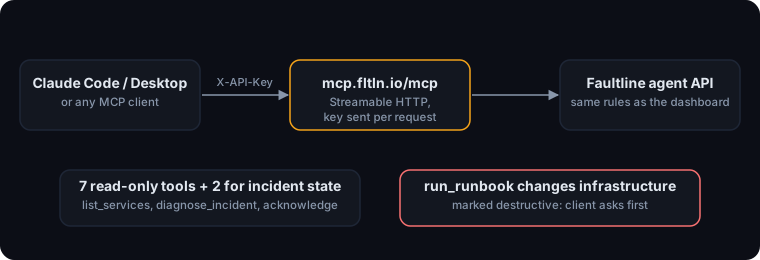
Faultline runs a remote MCP server at https://mcp.fltln.io/mcp using the Streamable HTTP transport from the Model Context Protocol spec. There is nothing to install for clients that speak HTTP; you authenticate with a Faultline API key sent as a header.
1. Create an API key
- In the dashboard, open Settings, API Keys (Pro plan and above; you need the Admin or Owner role).
- Create a workspace-wide key. Service-scoped keys are meant for the CLI on a single server.
- Copy it. Keys start with
flt_and are shown once; Faultline stores only a hash.
The key acts on your whole workspace, including running runbooks, so treat it like a password and give it only to people you would let approve a fix. You can send it as X-API-Key: flt_... or Authorization: Bearer flt_....
2. Configure your client
Claude Code:
claude mcp add --transport http faultline https://mcp.fltln.io/mcp \
  --header "X-API-Key: flt_your_key_here"
Add --scope user to make it available in every project. Run /mcp inside Claude Code to confirm it connected. The Claude Code MCP docs cover scopes and the other options.
Claude Desktop: Desktop's config file launches local servers, so use the mcp-remote bridge (needs Node.js). Edit claude_desktop_config.json (Settings, Developer, Edit Config) and restart Desktop:
{
  "mcpServers": {
    "faultline": {
      "command": "npx",
      "args": [
        "-y", "mcp-remote", "https://mcp.fltln.io/mcp",
        "--header", "X-API-Key:${FAULTLINE_API_KEY}"
      ],
      "env": { "FAULTLINE_API_KEY": "flt_your_key_here" }
    }
  }
}
Other clients (Cursor and anything that takes a JSON config with HTTP servers):
{
  "mcpServers": {
    "faultline": {
      "type": "http",
      "url": "https://mcp.fltln.io/mcp",
      "headers": { "X-API-Key": "flt_your_key_here" }
    }
  }
}
3. What can Claude do with Faultline?
Read your monitors, incidents, on-call, and anomalies, change incident state, and run a runbook you approve. These are the ten tools:
| Tool | What it does | Changes anything? |
|---|---|---|
list_services | Your monitors and their current status | No |
get_service | One service with its 10 most recent checks | No |
list_incidents | Open incidents, or resolved ones for history | No |
get_incident | Full incident: timeline, AI summary, post-mortem | No |
who_is_on_call | Who is on call for each rotation, and until when | No |
list_anomalies | Recent latency anomalies against learned baselines | No |
diagnose_incident | Recommends a next step and candidate runbooks. Analysis only | No |
acknowledge_incident | Acknowledges an incident, which stops escalation | Yes, incident state |
resolve_incident | Resolves an incident with an optional note | Yes, incident state |
run_runbook | Runs one of your runbooks against an incident | Yes, your infrastructure |
How do approvals work?
Your MCP client asks you before a tool runs, and Faultline enforces its own rules on top:
- Every tool tells your client whether it is read-only.
run_runbookis marked destructive, and its description tells the agent to call it only after a diagnosis recommended it and you confirmed. - Your MCP client is where you approve. Claude Code and Claude Desktop ask before calling a tool you have not allowed. We recommend allowing the read-only tools freely and never auto-allowing
run_runbook. - Server-side, a runbook can only run if it belongs to the incident's service, and the same incident rules as the dashboard apply (for example, a resolved incident cannot be resolved again).
- Anything Claude does is tagged
[agent]on the incident timeline. Agent actions do not send notifications, so your team is not paged by Claude's own acknowledgements. - Every runbook run, from any source, is verified afterwards and pages on-call if it did not work. See Runbooks and approvals.
What does a session look like?
An illustrative Claude Code session (service names are examples). First, Claude investigates:
You:     Anything on fire?

Claude:  [list_incidents]
         One open incident: "checkout-api is DOWN", CRITICAL, opened 4 minutes
         ago, not acknowledged.

You:     What's going on with it?

Claude:  [get_incident] [get_service] [diagnose_incident]
         The last 6 checks returned 503 after about 4s, starting right after a
         deploy. The database and cache monitors are healthy, so this looks
         isolated to checkout-api. Faultline recommends the runbook
         "Restart checkout-api" (confidence: high), which fixed the last two
         similar incidents.
Then you approve the fix:
You:     Do it.

Claude:  [run_runbook]  <- your client asks you to approve this call
         Started "Restart checkout-api". Faultline will verify recovery in about
         2 minutes and page on-call if the service is still down.
What does Faultline see of my conversation with Claude?
Only the tool calls. Your prompts and Claude's replies stay between you and your client; Faultline receives the tool name and its arguments, such as an incident ID, and returns the result. The MCP server is stateless: it holds your API key only for the length of one request and keeps no session store.
Can a client list the tools without an API key?
Yes, so that connector directories can show the toolset. The initialize and tools/list calls work without a key. Any other call, including a batch that mixes one in, gets a 401, so nothing about your workspace is visible without a key.
What if it does not connect?
- 401 errors: the key is missing, mistyped, or revoked. Check the header name and that the key starts with
flt_. - Desktop shows no tools: confirm Node.js is installed (
npx --version), then restart Desktop fully. - diagnose_incident says AI is unavailable: your workspace may have used its monthly AI allowance; see Security and data handling.
More docs
- Quickstart: first monitor in 5 minutesAdd an HTTP monitor, route alerts, and trigger a real test incident.
- AWS IAM role setupThe exact trust and permission policies, read-only first, remediation optional.
- Runbooks and approvalsApproval by default, per-runbook auto-run, verification, and the audit trail.
- CLI and heartbeatsMonitor cron jobs, queue workers, and Docker containers.
- Security and data handlingTenant isolation, sign-in, AI data flow, token caps, and retention.