
Runbooks and approvals
Runbooks fix the failures you already know how to fix. By default, none of them run without a person saying yes.
By Chris Collareta · Published · Updated
Do runbooks run automatically?
Only the ones you switch to Auto-run. Every new runbook requires approval, and every runbook has one setting that decides who pulls the trigger, shown in the runbook form under Execution:
| Setting | What happens when a matching incident opens |
|---|---|
| Require approval | Nothing runs. The runbook is offered as a recommended fix on the incident, and runs only when someone approves it. This is the default for every new runbook. |
| Auto-run | The runbook starts as soon as an incident matching its severity and service opens. You opt in per runbook; there is no account-wide switch. |
A runbook matches an incident by severity (for example, CRITICAL only) and optionally by service. Anything other than an explicit Auto-run is treated as Require approval.
Who can approve a runbook?
- Dashboard: an Admin or Owner clicks Run on the incident. Members can see recommendations but cannot run them.
- In-app copilot: when the assistant wants to run a runbook, resolve, or acknowledge, it stops and shows an approval card. Only an Admin or Owner can approve; for anyone else the action is declined automatically.
- MCP (Claude Code, Claude Desktop):
run_runbookis marked destructive, and your client asks before calling it. Anyone holding the API key can approve, so give keys only to people you would let run a runbook. See Connect Claude. - Slack: the Slack bot can investigate and recommend, but cannot run anything.
Available actions
| Action | What it does |
|---|---|
| Restart ECS Service | Forces a new deployment (UpdateService with forceNewDeployment), then waits for the rollout to finish (polled every 30 seconds, fails after 10 minutes). Needs the remediation policy on your IAM role. |
| Scale ECS Service | Sets the service's desired task count. |
| Restart Service / Docker Container (via Agent) | Runs systemctl restart or docker restart on your own host through the polling remediation agent. No inbound access or SSH keys. Fails if the agent does not report back within 5 minutes. |
| HTTP Request | Calls a URL (GET, POST, PUT, DELETE, PATCH) and optionally checks the status code. Use it to hit a cache-flush or failover endpoint. |
| Re-run Monitor Check | Runs the service's health check immediately and fails the step if it still fails. |
| Notify via Slack, PagerDuty, Webhook, or Email | Sends a message. Webhooks are HMAC-signed when you set a secret. |
| Wait | Pauses 1 to 900 seconds without holding a worker. |
| Resolve Incident (if healthy) | Resolves the incident only if the service is currently OK or degraded. If it is still down, the step fails and the incident stays open, so a runbook can never close a live outage. |
Each step can retry up to 3 times (2, 4, then 8 seconds apart) and can be marked continue-on-failure. Otherwise a failed step stops the runbook and the failure, with its error, goes on the incident timeline.
How does Faultline know a runbook worked?
It reads the service's status 2 minutes after the run, because a runbook finishing is not the same as the service recovering. After every run, auto or approved, Faultline checks:
- 2 minutes after the run finishes, it reads the service's current status (kept fresh by the normal checks).
- OK or degraded: the timeline records that remediation was verified.
- Still down: it looks once more 2 minutes later, because a service can be slow to pass its recovery checks.
- Still down on the second look: the timeline records that remediation did not work and on-call is paged at CRITICAL. Automation never fails silently.
- Paused or pending: recorded as inconclusive, with no page, so maintenance does not cause false alarms.
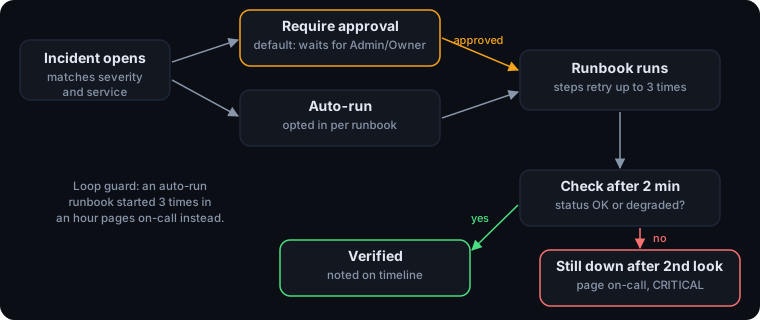
Loop guard: an auto-run runbook that has already started 3 times in the past hour is not started again. The skip is noted on the timeline and on-call is paged instead, so a flapping service is never restarted in a loop.
Faultline does not undo steps automatically. When remediation does not work, the safety net is handing the incident to a person, with everything that was tried already on the timeline.
What gets recorded?
- Incident timeline: runbook started (and who approved it, or that it started automatically), every step's result with its error if it failed, completion or failure, and the verification outcome. Actions taken through an AI agent are tagged
[agent]. - Execution record: every step's status, start and finish time, output, and error, kept with the incident.
- Audit log (Growth and Enterprise): who approved which runbook against which incident, alongside every create, update, and delete in the account.
Can an AI suggestion run without approval?
No. AI picks from runbooks you wrote, and a person still approves every run.
- Recommended fixes (on an incident, in the copilot, or through MCP
diagnose_incident) are analysis only. The AI can only pick from runbooks you already wrote, and Faultline checks server-side that the pick belongs to the incident's service before anything can run. - Drafted runbooks (Draft from history) come back as a form for you to review and save. They always arrive set to Require approval; only a person can switch one to Auto-run.
- Running anything still needs one of the approvals above.
More docs
- Quickstart: first monitor in 5 minutesAdd an HTTP monitor, route alerts, and trigger a real test incident.
- AWS IAM role setupThe exact trust and permission policies, read-only first, remediation optional.
- Connect Claude (MCP)API key, Claude Code and Claude Desktop config, tools, and a sample session.
- CLI and heartbeatsMonitor cron jobs, queue workers, and Docker containers.
- Security and data handlingTenant isolation, sign-in, AI data flow, token caps, and retention.