
Security and data handling
How your data is separated from other customers, who can sign in, what reaches the AI model, and how long anything is kept.
By Chris Collareta · Published · Updated
How is my data kept separate from other customers?
Faultline keeps each customer's data separate in the application layer: every workspace is a tenant, and every record it owns, from check results to runbooks and API keys, carries its tenant ID. Each API request resolves the tenant from the verified session token or API key, never from the request body, and a tenant-scoped data layer adds that ID to every database read and write. All workspaces share one PostgreSQL database, so isolation depends on that layer rather than on separate databases or row-level security. Background workers act only on records named in internal queue messages that the tenant-scoped API creates. API keys are stored only as SHA-256 hashes, Slack bot tokens are encrypted with AES-256-GCM, and heartbeat URLs carry 192-bit random tokens. For AWS, each workspace gets its own server-generated ExternalId, so another Faultline customer cannot assume your IAM role even if they learn its ARN.
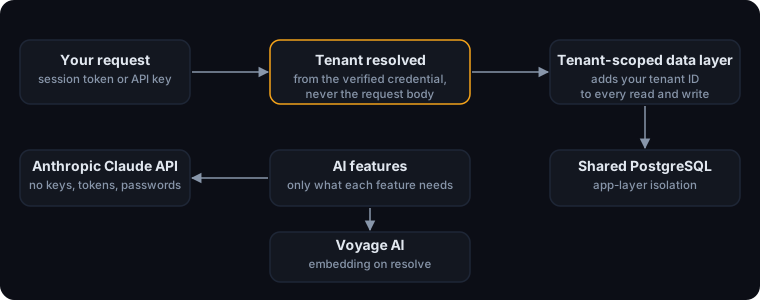
The details:
- Each workspace is a tenant. Every record a workspace owns (services, check results, incidents, runbooks, API keys, audit log, and so on) carries its tenant ID.
- Every API request resolves your tenant from your verified session or API key, never from anything in the request body. Database access goes through a tenant-scoped layer that adds your tenant to every read and write automatically.
- Background workers (checks, runbooks, escalation, notifications) never take work directly from a request. They act only on records named in Faultline's internal queue messages, which the tenant-scoped API creates.
- All workspaces share one PostgreSQL database. Isolation is enforced in the application layer described above, not by separate databases or database row-level security.
- AWS access is per workspace: each workspace gets its own server-generated ExternalId, so no other customer can use your role (AWS's defense against the confused deputy problem). See AWS IAM role setup.
- Remediation agents on your own hosts only call out to Faultline. Faultline never opens a connection to your machines and holds no SSH keys.
Who can sign in, and what can each role do?
- Sign-in is handled by Clerk. Faultline never sees or stores your password. With Sign in with Google, Faultline receives only your name, email address, and profile picture.
- Every dashboard request carries a signed session token that is verified before anything else runs.
- Roles are Owner, Admin, Member, and Viewer. Running a runbook, approving AI actions, creating API keys, and changing alert routing need Admin or above.
- API keys (
flt_...) are shown once and stored only as a SHA-256 hash. You can revoke a key at any time and see when it was last used. - Heartbeat ping URLs use 192-bit random tokens. Slack bot tokens are encrypted with AES-256-GCM and never leave the API. Outgoing webhooks can be HMAC-signed.
What incident data goes to the AI model?
Only what each feature needs. AI features use Anthropic's Claude API, under Anthropic's commercial terms, and Faultline never sends your Faultline API keys, AWS credentials, Slack tokens, or passwords.
| Feature | When it runs | What is sent |
|---|---|---|
| Incident summary | Automatically when an incident opens, or on request | Incident title, severity, and timeline; the service's recent check results (status codes, latency, error text); the status of your other services |
| Post-mortem draft | On request | The incident, its timeline, response timings, and runbook results |
| Recommended fix (incl. MCP diagnose) | On request | The incident, recent checks, other services' status, your runbooks' titles and step types, and similar past incidents |
| Runbook draft | On request | The service's name, type, and monitor configuration (which includes any request headers or TLS settings you entered), and its last 10 resolved incidents with timelines and runbook results |
| Monitor from description | On request | The text you type |
| Copilot console and Slack bot | When you ask | Your messages and the service, incident, and on-call details the assistant looks up to answer |
- Model provider retention: [TBC: Anthropic's retention period and training terms under Faultline's agreement]
- Incident memory: when an incident resolves, a text summary of it (title, service, root cause, AI summary, post-mortem, error samples, and the runbook that fixed it) is sent to Voyage AI to create a search embedding. The embedding is stored in Faultline's database and only ever compared with your own workspace's incidents.
- CLI:
faultline askruns on your machine with your own Anthropic API key, under your own terms with Anthropic. - AI output is advisory. It cannot change anything without approval; see Runbooks and approvals.
AI token caps
| Plan | AI tokens per month |
|---|---|
| Free | 100,000 |
| Pro | 2,000,000 |
| Growth | 5,000,000 |
| Enterprise | Unlimited |
- A token is any input or output token the model processes for your workspace, including cached input. Automatic incident summaries count.
- Usage resets on the 1st of each month (UTC). The check happens before each AI request, so the request already in progress when you reach the cap can finish slightly over it.
- At the cap, AI features return a limit message until the reset or an upgrade. Monitoring, alerting, escalation, and runbooks are not affected.
faultline askuses your own key and does not count.
Where is data stored, and for how long?
- Location: [TBC: hosting provider and region for the API, workers, and database]
- In transit: all traffic to Faultline uses TLS.
- At rest: [TBC: database encryption at rest, e.g. RDS storage encryption]
| Data | Kept for |
|---|---|
| Individual check results | 7 days (Free), 90 days (Pro), 180 days (Growth), 365 days (Enterprise) |
| Hourly uptime rollups | 1 year |
| Daily uptime rollups (status page history) | While your account is active |
| Incidents, timelines, runbook runs, audit log | While your account is active |
| Account data | While your account is active and a reasonable period afterward, unless the law requires longer |
Old check results are deleted by a daily job. See the privacy policy for sub-processors and your rights, or email hello@fltln.io with security questions.
More docs
- Quickstart: first monitor in 5 minutesAdd an HTTP monitor, route alerts, and trigger a real test incident.
- AWS IAM role setupThe exact trust and permission policies, read-only first, remediation optional.
- Runbooks and approvalsApproval by default, per-runbook auto-run, verification, and the audit trail.
- Connect Claude (MCP)API key, Claude Code and Claude Desktop config, tools, and a sample session.
- CLI and heartbeatsMonitor cron jobs, queue workers, and Docker containers.